Table of contents
Open Table of contents
The Problem
signtool.exe is a program for digitally signing other executable files. To sign a file, you need a corresponding certificate (code signing certificate).
As an example, we want to sign the PowerShell script test.ps1.
From one day to the next, I could no longer sign on a machine, receiving the following error:
C:\Program Files (x86)\Windows Kits\10\bin\10.0.22621.0\x64>signtool.exe sign /s my /fd SHA256 /ph /td SHA256 /tr http://timestamp.digicert.com C:\Temp\signing\test.ps1
Done Adding Additional Store
SignTool Error: An error occurred while attempting to load the signing
        certificate from: C:\Temp\signing\test.ps1
Details about what these parameters do can be found here: signtool.exe Parameters
Troubleshooting
signtool.exe is not exactly known for verbose error messages or explanations.
There is a /debug parameter for signtool.exe /sign. This can be helpful in some scenarios when you want to know which certificate is being selected. But ultimately, it results in the same error message for us.
To my knowledge, there is no additional “debug error logfile” or similar. Let’s look at the error:
SignTool Error: An error occurred while attempting to load the signing certificate from: C:\Temp\signing\test.ps1
The error message is quite confusing because it says it would like to load the signing certificate from the file (that we actually want to sign). That doesn’t make much sense to me.
There are quite a few discussions about the error:
- https://learn.microsoft.com/en-us/answers/questions/1324584/signtool-unable-to-load-signing-certificate
- https://github.com/electron-userland/electron-builder/issues/816
- https://github.com/electron/windows-installer/issues/32
But none of these led to a solution for my problem.
Current Status
What do we know about the current situation:
- The code signing certificate itself is fine (works on other clients)
- My usage (CLI parameters) of
signtool.exeis correct (works exactly the same on other clients)
The only manual process in my scenario is importing the code signing certificate into the certificate store.
Importing the Certificate
We know from the /debug output that the code signing certificate is essentially found and selected. Let’s look at the available options:
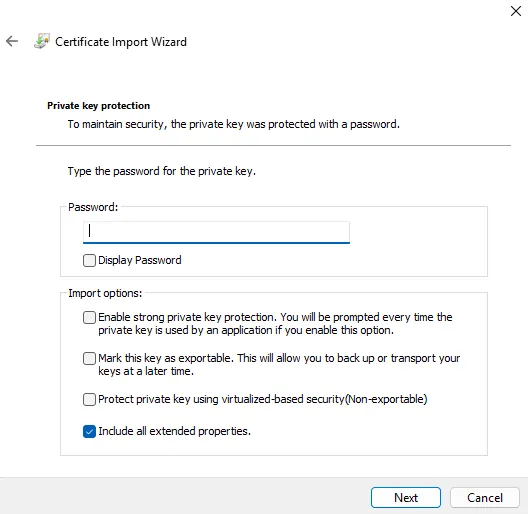
Include all extended properties is already selected by the wizard.
This is the only step where we can make changes; the rest of the wizard leaves no room for deviation.
If we now complete the wizard with the settings shown above, signing works again.
Here’s an overview of the variants I tried (they simply follow the order of options as shown in the screenshot):
----------------------
[ ]
[ ]
[ ]
[x]
----------------------
[x]
[x]
[ ]
[x]
----------------------
[x]
[x]
[ ]
[ ]
----------------------
[ ]
[ ]
[x]
[x]
----------------------
[x]
[ ]
[ ]
[x]
----------------------
[ ]
[ ]
[x]
[ ]
----------------------
[ ]
[ ]
[x]
[x]
----------------------
[x]
[ ]
[ ]
[ ]
----------------------
[x] -----> ERROR CASE
[ ]
[x]
[x]
----------------------
[x] -----> ERROR CASE
[ ]
[x]
[ ]
----------------------
As soon as we select only the top option, we get: 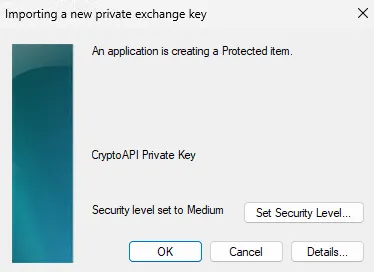 When we select only the third option, we don’t get an additional prompt.
If we select the first and third options, we get the following dialog: 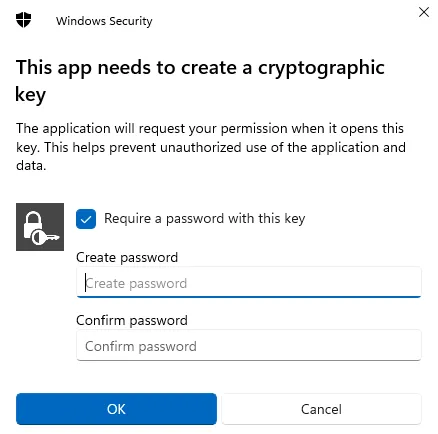
As soon as a password is assigned, we can no longer sign. So when we deselect the Require a password with this key option, this variant also works.
Let’s call it a day
Does this mean it generally doesn’t work? Definitely not. On other machines, I can use this option (and originally also on the “problem machine”) and actually get a prompt every time during signing. I tried to find out more but couldn’t quickly identify what the problem is. Both signtool.exe and the equivalent PowerShell Set-AuthenticodeSignature provide poor error messages.
Using procdump.exe, you can easily have exceptions that are thrown by a program printed out. If we do that with signtool.exe using the following CLI:
C:\Program Files (x86)\Windows Kits\10\bin\10.0.22621.0\x64>C:\Temp\SysinternalsSuite\procdump.exe -e 1 -f "" -w signtool.exe

ProcDump v11.0 - Sysinternals process dump utility
Copyright (C) 2009-2022 Mark Russinovich and Andrew Richards
Sysinternals - www.sysinternals.com

Waiting for process named signtool.exe...

Process:               signtool.exe (8828)
Process image:         C:\Program Files (x86)\Windows Kits\10\bin\10.0.22621.0\x64\signtool.exe
CPU threshold:         n/a
Performance counter:   n/a
Commit threshold:      n/a
Threshold seconds:     n/a
Hung window check:     Disabled
Log debug strings:     Disabled
Exception monitor:     First Chance+Unhandled
Exception filter:      [Includes]
                       *
                       [Excludes]
                       *
Terminate monitor:     Disabled
Cloning type:          Disabled
Concurrent limit:      n/a
Avoid outage:          n/a
Number of dumps:       1
Dump folder:           C:\Program Files (x86)\Windows Kits\10\bin\10.0.22621.0\x64\
Dump filename/mask:    PROCESSNAME_YYMMDD_HHMMSS
Queue to WER:          Disabled
Kill after dump:       Disabled


Press Ctrl-C to end monitoring without terminating the process.

[16:16:10] Exception: E06D7363.?AVcapilib_error@@
[16:16:10] Exception: E06D7363.msc
[16:16:10] Exception: E06D7363.msc
[16:16:10] Exception: E06D7363.?AVcapilib_error@@
[16:16:10] Process Exit: PID 8828, Exit Code 0x00000001
[16:16:10] The process has exited.
[16:16:10] Dump count not reached.
When signtool.exe works, the ending looks like this:
[16:21:57] Process Exit: PID 11800, Exit Code 0x00000000
[16:21:57] The process has exited.
[16:21:57] Dump count not reached.
The exception code E06D7363 is a kind of “generic error message” — see the blog post by Raymond Chen.
We found a workaround — the root cause of the problem is still unresolved and perhaps something for another time…
Happy Troubleshooting.