Table of contents
Open Table of contents
The Setup
In our environment, we have the following components:
- Citrix Provisioning Server (Version 2206):
- ctxpvs1 (192.168.0.30)
- ctxpvs2 (192.168.0.31)
- Target Device:
- ctxvda1master (192.168.0.103)
Failover Process
We want to examine the failover process of a target device from one PVS server to another PVS server.
To simulate the failover, we will stop the Citrix PVS Stream Service via services.msc.
Prerequisites
General information can be found at: PVS HA - docs.citrix.com.
For a successful failover, the following is required:
- The vDisk must be exactly the same on both PVS servers (even different timestamps are problematic)
- The vDisk in the PVS console must be set to
Use the load balancing algorithm.Best Effortis also fine and allows failover preferably within subnet boundaries.Fixedprohibits failover across subnet boundaries. Reference: CTX138933
- The PVS servers and the target device must be able to reach each other over the network.
For network connectivity, we can refer to the Port Matrix from Citrix.
Failover
In the test lab, the target device (ctxvda1master - 192.168.0.103) is connected to the PVS server (ctxpvs2 - 192.168.0.31). We stop the Citrix PVS Stream Service and when the failover should occur, nothing happens. The target device hangs.
Troubleshooting
PVS is a product that operates at the network level, so it makes sense to capture a network trace. One way to do this (for Server 2019 and higher):
network tracing:
pktmon start --capture
{reproduce the problem}
pktmon stop
pktmon etl2pcap PktMon.etl --out PktMon.pcapng
Theoretically, a CDF trace could also be useful. However, Citrix does not provide Public Symbols for StreamProcess.exe (but they do for SoapServer.exe!). A CDF trace of SoapServer.exe is almost certainly not helpful.
How does it work?
To troubleshoot the problem, we need to know what/how things communicate. The Port Matrix reference shows the following communication table between Target Device and Provisioning Server:
| Source | Destination | Type | Port | Details |
|---|---|---|---|---|
| Target Device | PVS Server | UDP | 6910-6930 | vDisk Streaming |
| Target Device | PVS Server | UDP | 6901,6902,6905 | ?? |
In the default configuration (which can be changed), UDP ports 6910-6930 are used for “content streaming” (i.e., the content of a vDisk to the target device).
But there are also ports 6901, 6902, and 6905. I’m not aware of any publicly available documentation that describes exactly what these ports are for.
Analysis
The normal streaming activity from the vDisk to the target device looks like this in the network trace:
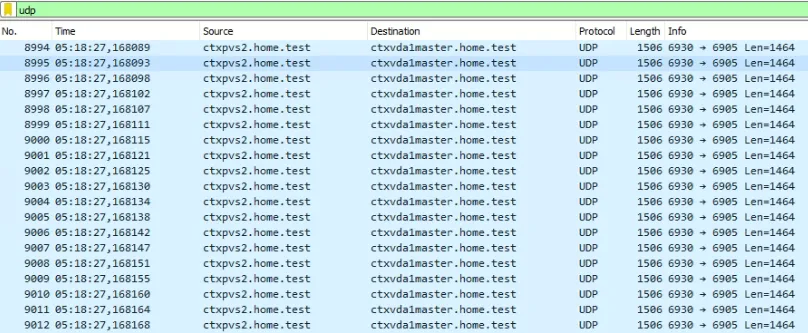
ctxpvs2 sends data over port 6930 to the target device on port 6905. Port 6905 on the target device is the service that processes the vDisk data.
What’s actually happening on ctxpvs1 (the PVS server the target device should “failover” to):

Ports 6903 and 6895 are being used; port 6895 is listed in the Port Matrix under “Inter-server communication”. So this was the communication between the two PVS servers.
When we look at the network traffic from ctxpvs2, we see the following regarding the failover:

Packet 9013 is the last packet sent as a “normal” streaming packet. After this packet, we see a new UDP stream where the PVS server tries to contact the target device on port 6902. This port is blocked on the target device because it’s not specified in the Port Matrix.
We also see packets on the target device:

There is no response to the request from the target device.
It appears that ctxpvs2 wants to tell the target device ctxvda1master: “My Citrix PVS Stream Service has stopped, please failover to another PVS server.”
When port 6902 is allowed on the target device firewall, the network trace looks like this:
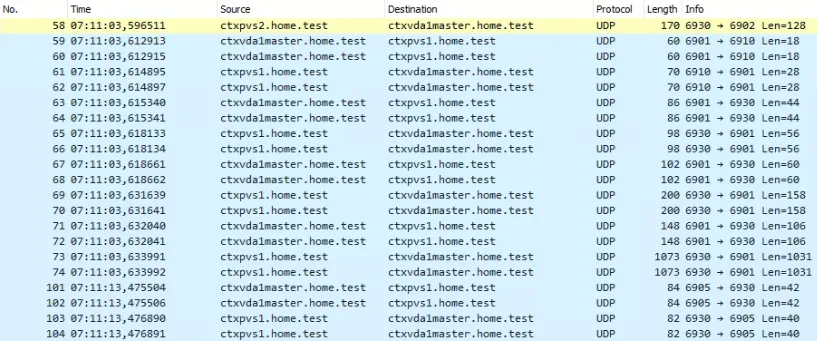
And again we see a UDP packet from ctxpvs2 to ctxvda1master on port 6902 — but this time with an important difference. The target device now connects to the other PVS server (ctxpvs1) on port 6910. Then we see more communication between ctxvda1master (port 6901) and ctxpvs1 (port 6930). And finally, we see the familiar pattern between ports 6905 and 6930 in the network trace.
Wait, the failover works for me…
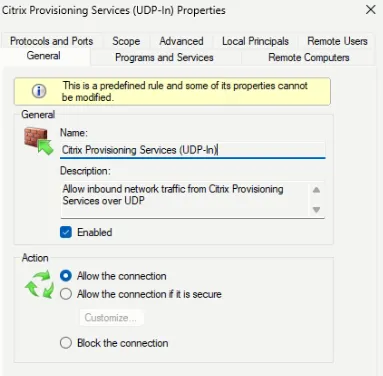
Obviously, the Port Matrix is missing the correct specification of what is needed for a “graceful failover.” But most people who install the target device software won’t have problems. Why? Because the setup automatically creates firewall rules:
Summary
In summary, based on the analysis described above, the firewall on the target device absolutely needs port 6902 open for a “graceful failover.”
The target device setup creates the firewall rules.
But unfortunately, this information is missing from the Citrix documentation.
Additionally, the System Requirements state that port 6901 must be allowed. This requirement is neither automatically set by the setup (via firewall rules) nor specified in the Port Matrix.
It’s probably a good approach to open all described ports (6901, 6902, 6905) between PVS server and target device.
I tweeted about this over a year ago — but since then the Port Matrix still hasn’t been updated. I have now recreated the scenario with the latest version to verify that the behavior is still the same.
Finally, I’d like to add that this can’t be the only failover mechanism. We’ve looked at the “graceful failover,” but if the PVS server dies from one moment to the next, the communication described above can no longer take place. So there’s obviously a “Plan B.” That would be a topic for another blog post.
Happy troubleshooting.