Table of contents
Open Table of contents
Error Message
The root cause and the solution are thanks to Microsoft Support.
Since I found the error and the root cause interesting, I’m documenting it here.
Signing in via the Azure Remote Desktop Client (MSI) was not successful after entering the username and password, resulting in the following error message:
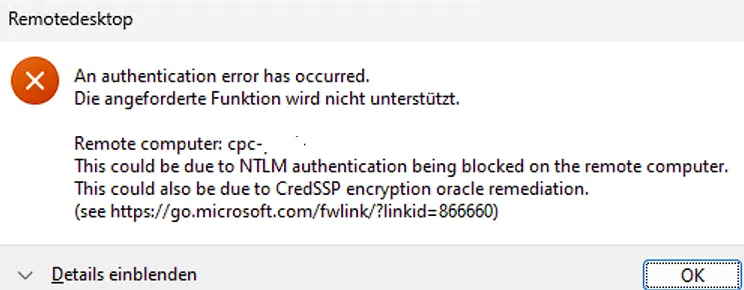
An authentication error has occurred.
The requested function is not supported.

Remote computer: cpc-
This could be due to NTLM authentication being blocked on the remote computer.
This could also be due to CredSSP encryption oracle remediation.
(see https://go.microsoft.com/fwlink/?linkid=866660)
Initial Troubleshooting
With Microsoft Dev Box, there is the option to configure Single Sign-On (SSO). The machines are Entra ID-only (AADJ) devices. However, the error message only appeared on machines that were in a pool without SSO configured. Machines with SSO continued to work without any issues.
NTLM Authentication
The first part of the error message suggests that NTLM authentication is blocked. This is surprising for two reasons:
- NTLM has been blocked on the machines from the very beginning
1.1. Network security: Restrict NTLM: NTLM authentication in this domain
1.2. Network security: Restrict NTLM: Incoming NTLM traffic
1.3. Network security: Restrict NTLM: Outgoing NTLM traffic to remote servers - NTLM should not be used as an authentication protocol at all
2.1. The protocol being used is PKU2U. Details can be found at How Authentication works when you use remote desktop by Steve Syfuhs
So NTLM should not play any role in signing in to the Dev Box.
CredSSP Oracle Remediation
There are some hints/explanations on the website Error when you try to RDP to a Windows VM in Azure: CredSSP encryption oracle remediation.
To keep it brief, devices with a reasonably current patch level should not have any issues. Both my client and the Microsoft Dev Box are fully patched.
So the error message doesn’t really help us narrow down or solve the problem.
Microsoft-Windows-AAD/Operational
In the event log Microsoft-Windows-AAD/Operational, the following entries can be found:
1301 [4]04BC.40F8::03/11/25-22:53:26.1771681 [Microsoft-Windows-AAD/Operational ] OAuth response error: invalid_resource

1302 Error description: AADSTS50001: The service principal for resource 'urn:p2p_cert' is disabled. This indicate that a subscription within the tenant has lapsed, or that the administrator for this tenant has disabled the application, preventing tokens from being issued for it. Trace ID: 5028XXXX-1548-465f-bcfd-0acb66c6XXXX Correlation ID: b5d0XXXX-fd35-4327-924b-b840e251XXXX Timestamp: 2025-03-12 05:53:26Z

1322 [7]04BC.40F8::03/11/25-22:53:26.1787419 [Microsoft-Windows-AAD/Operational ] Update P2P device certificate failure. Status: 0xC000008A Correlation ID: b5d08fcb-fd35-4327-924b-b840e251XXXX

1345 [7]04BC.40F8::03/11/25-22:53:26.1788003 [Microsoft-Windows-AAD/Operational ] Logon failure. Status: 0xC000008A Correlation ID: b5d08fcb-fd35-4327-924b-b840e251XXXX
When searching for urn:p2p_cert, we find the following article: What is the P2P Server application and why is it registered in my tenant?.
The P2P Server application is application registered by Microsoft Entra ID to enable Remote Desktop Protocol (RDP) connections to any Microsoft Entra joined or Microsoft Entra hybrid joined Windows devices in your tenant.
That sounds interesting - the next step is to check the status of the P2P application in Entra ID.
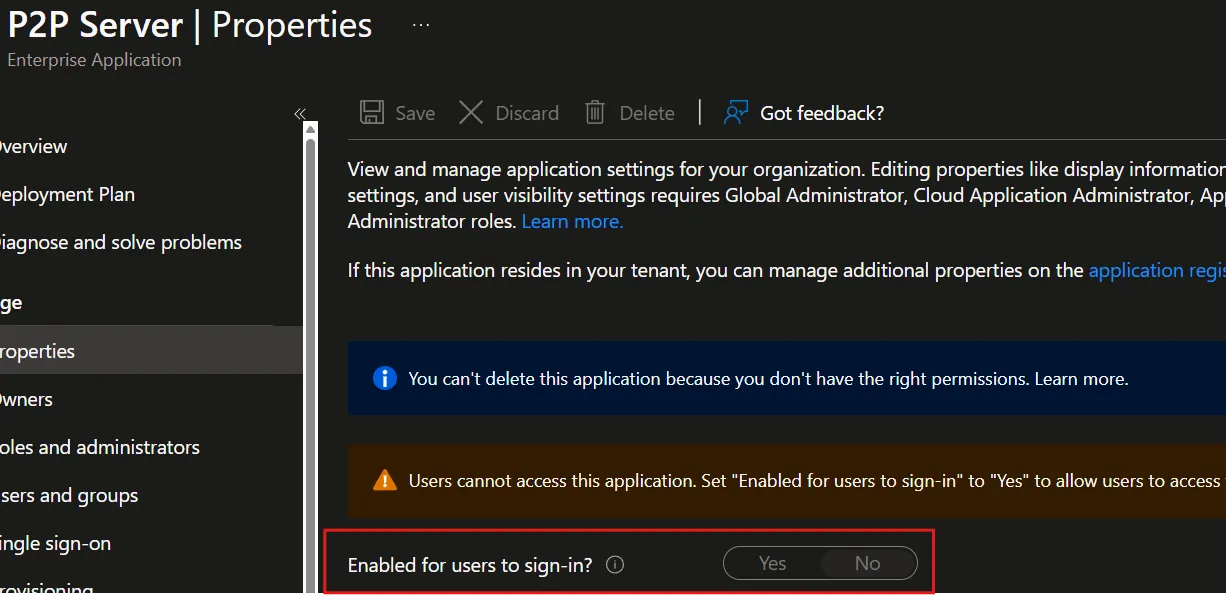
That doesn’t look right. After re-enabling it, sign-in worked without any issues.
Summary
The error message wasn’t particularly helpful, but the event log provided a good clue. After the Enterprise Application was re-enabled for users, sign-in to the Microsoft Dev Box worked again with username and password.